Home healthcare
Patients request a doctor, nurse, IV drip, injection, or wound care at home. Admin assigns the most suitable professional near the patient.

Loading your care experience…
Loading your care experience…
Doctor guide
A Pakistan-wide, English and Urdu telemedicine platform for PMDC-verified doctors. Set your own fee, keep 70% of paid consults, and manage patients from one workspace.
of every paid consult
to your bank account
video, urgent, Sunday
in-house visits
Watch first
A complete demo of ZindagiCare by Ibrahim Baja, founder and CEO of TechCognify and co-founder of ZindagiCare — covering home care, online consults, Sunday free care, urgent care, and the doctor workspace.
Compensation
Transparent rates, your own fee, and monthly payouts. Sunday free consults are volunteer work — ZindagiCare charges those patients nothing.
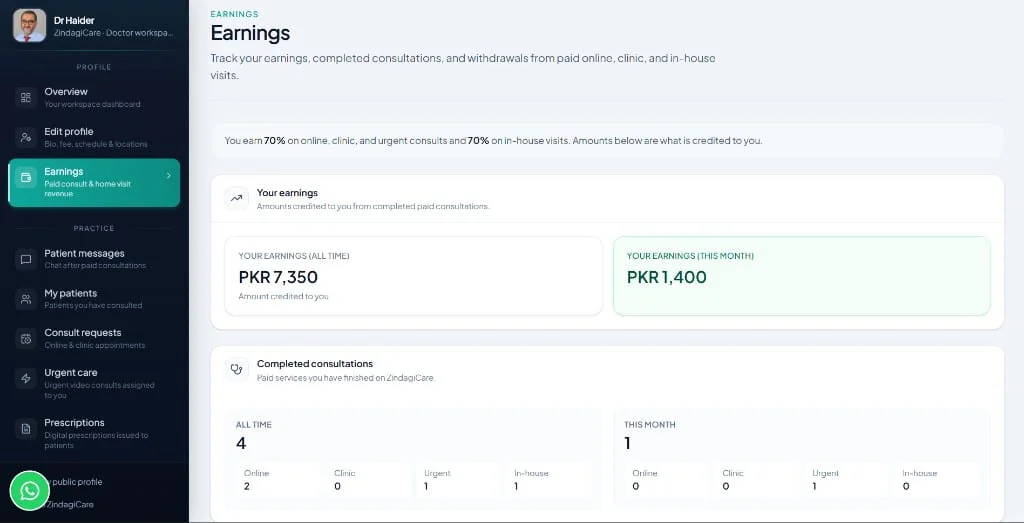
Same split on online, clinic, urgent, and in-house doctor visits. The Earnings screen already shows your credited 70% — not the patient's gross payment.
You set your fee
Choose your consultation fee in Edit profile. Patients see that amount when they book you.
Monthly payouts
We pay out monthly to your registered bank account. Email or WhatsApp us to request a transfer.
Sunday is volunteer
ZindagiCare takes no charge from Sunday free patients. If a patient chooses to contribute, you get 70% of it. Sunday rules
Where you can practice
Video, urgent, Sunday, and in-house doctor visits: available across Pakistan.
Example
A patient pays PKR 2,500 for an online consult. You are credited PKR 1,750 (70%). ZindagiCare retains PKR 750.
Getting started
Three steps from signup to seeing patients. English and Urdu throughout.
Create your doctor account
Register with email, phone, and professional details. Already a patient on ZindagiCare? Add a doctor profile to the same login.
Submit verification
Upload PMDC certificate, CNIC front and back, and degree certificate, plus your PMDC number and CNIC. Admin reviews every application.
Go live
Once approved, set your fee, weekly hours, and locations. Patients can book online consults; admin can assign urgent care and home visits.
The ecosystem
ZindagiCare is built around real healthcare needs in Pakistan, in English and Urdu.
Patients request a doctor, nurse, IV drip, injection, or wound care at home. Admin assigns the most suitable professional near the patient.
Patients browse verified doctors, view your profile and fee, pick a slot, pay, and join a secure video consult. Pakistan-wide.
Every Sunday, participating doctors volunteer 10-minute video slots for patients who cannot afford care. You can opt in or out.
When a patient needs a doctor now, admin assigns an available doctor within minutes. You join a live video call and can issue an e-Rx.
Doctor workspace
Every screen in your dashboard, with a short how-to. After approval, open Doctor workspace from the header. Screenshots use a dummy doctor and sample contacts — not real patients.
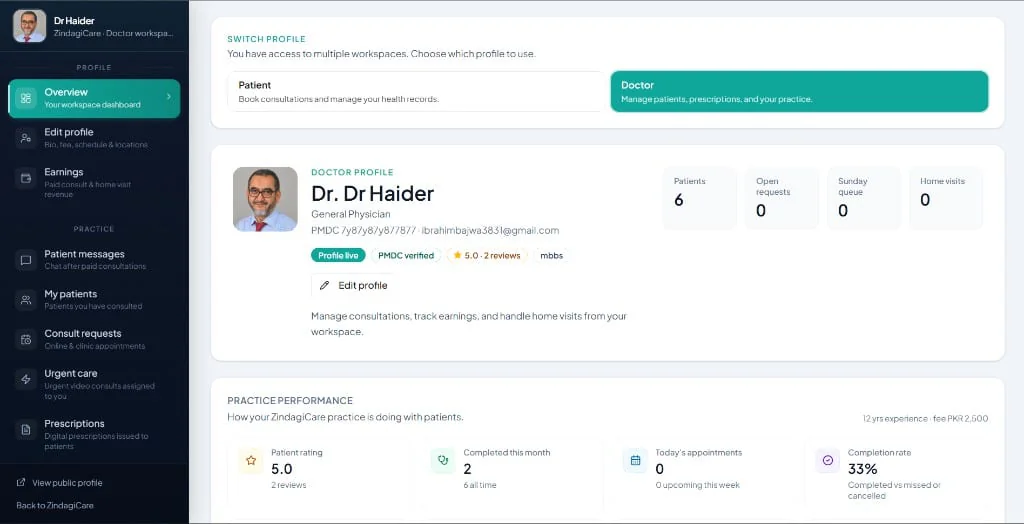
Your home screen: public profile status, PMDC badge, open requests, Sunday queue, home visits, rating, and completion rate. Switch between Patient and Doctor profiles if you use both.
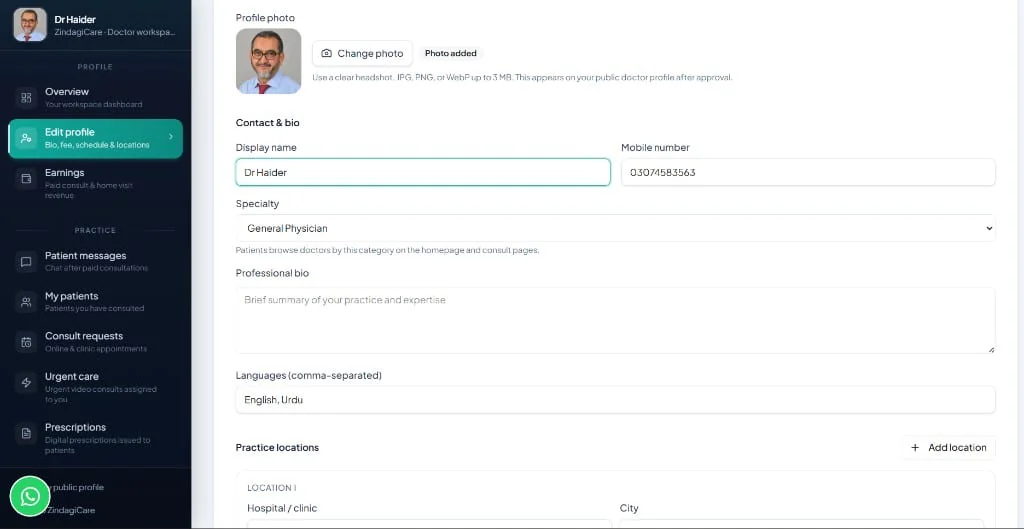
Control what patients see: display name, specialty, languages, professional bio, photo, and clinic locations. Your consultation fee is set here.
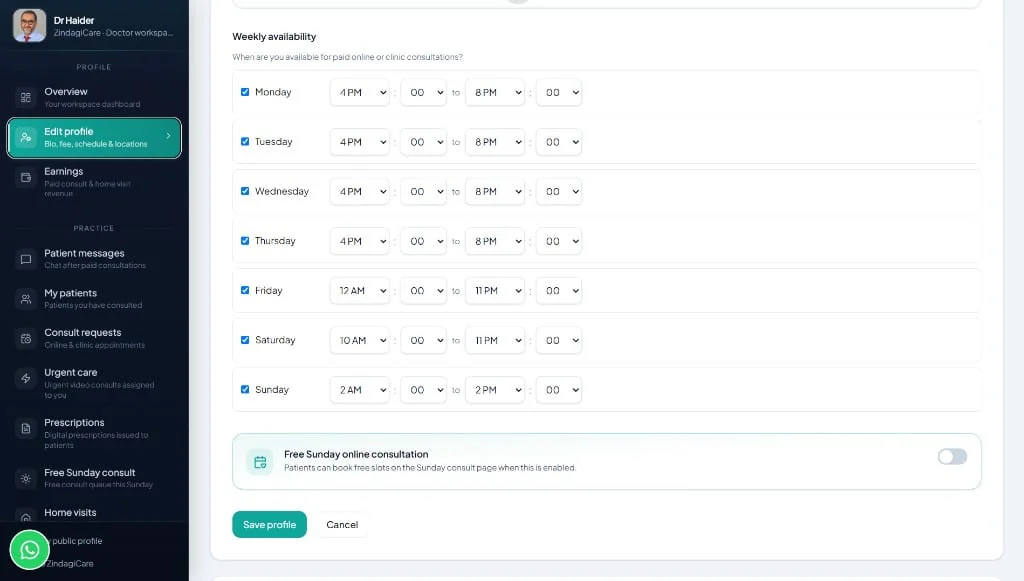
Tick the days you accept paid online or clinic bookings and set start/end times in Pakistan Standard Time. The Sunday free consult toggle is separate from paid hours.
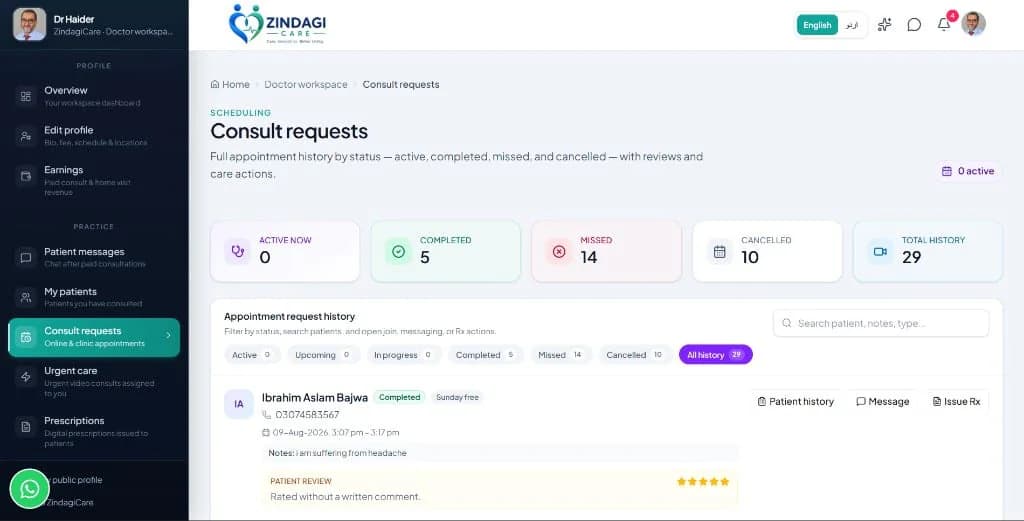
All online and clinic appointments: active, upcoming, completed, missed, and cancelled. Sunday free visits are tagged so you can tell them apart from paid consults.
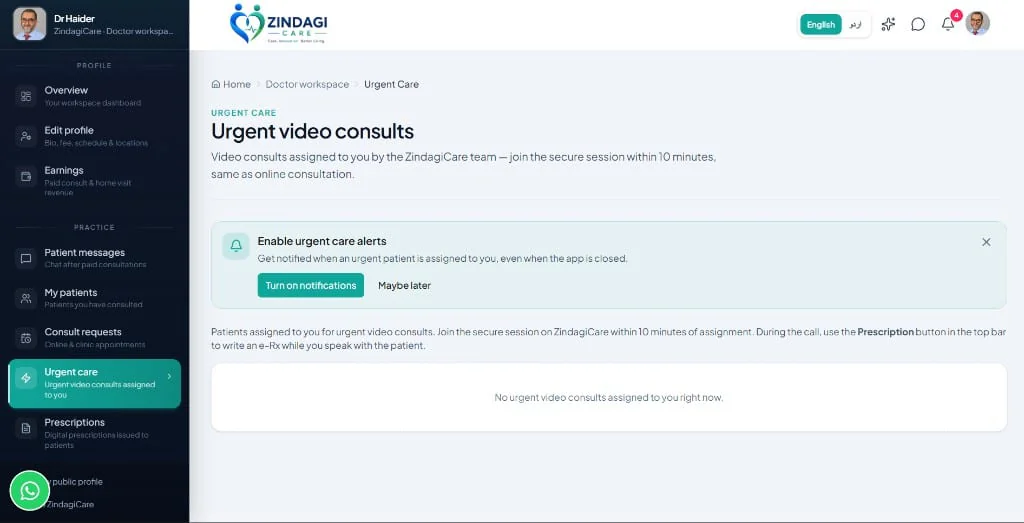
High-priority video consults assigned by the ZindagiCare team. You do not pick the patient — admin matches the next available doctor.
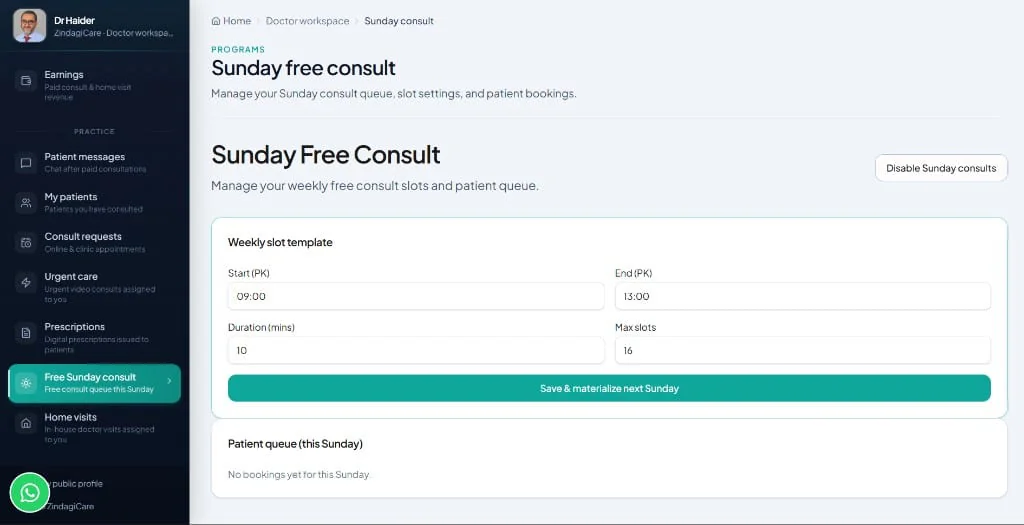
Volunteer care every Sunday for patients who cannot afford a paid visit. Pick waiting patients from the open board, choose a time, run the video consult, and tap Finish consultation when you are done. Full rules are in the Sunday free consult section below.
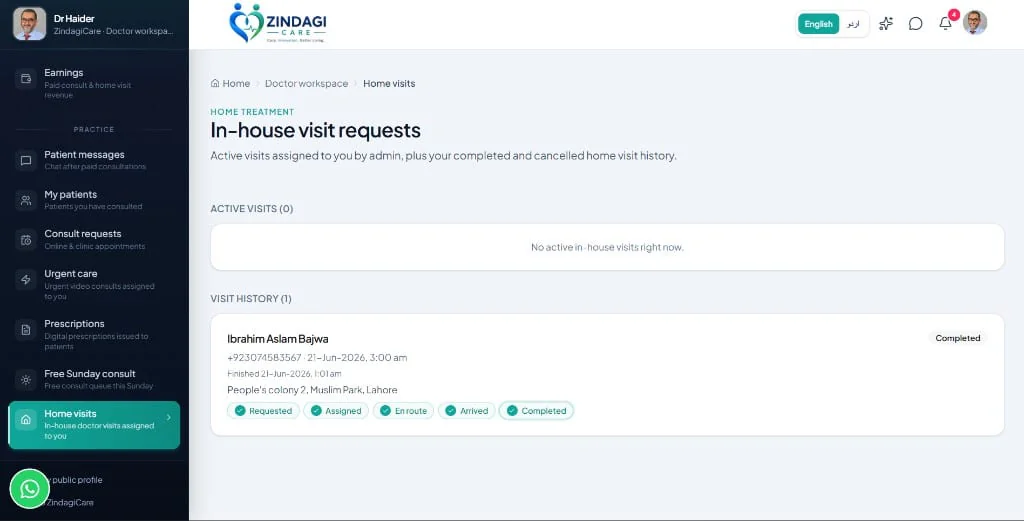
In-house doctor visits are assigned by admin. Update status as you travel so the patient and admin see live progress: requested → assigned → en route → arrived → completed.
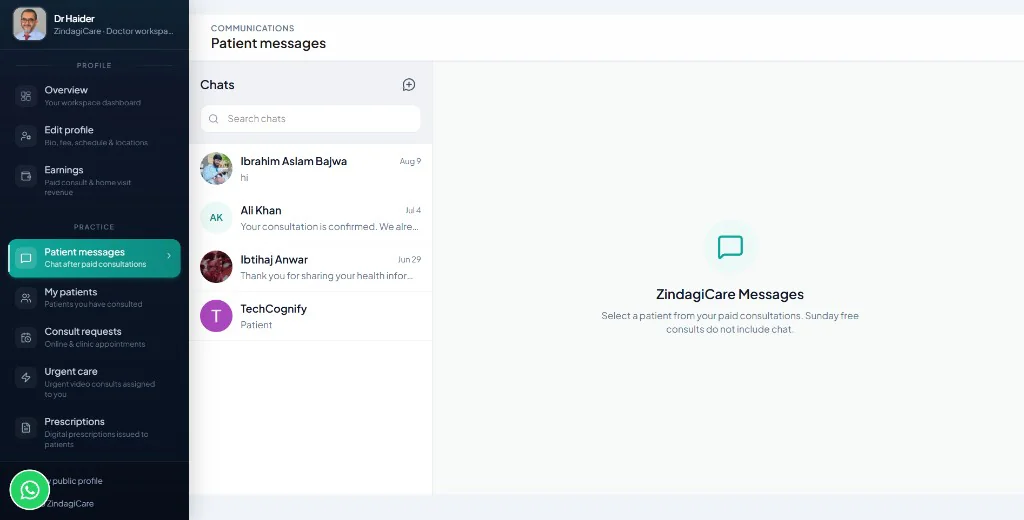
Secure chat for every consultation, paid or Sunday free, from booking until you tap Finish consultation (or 72 hours after the slot if you never do). After that the chat stays readable but closed. Use this for follow-up questions, not for new unpaid diagnoses.
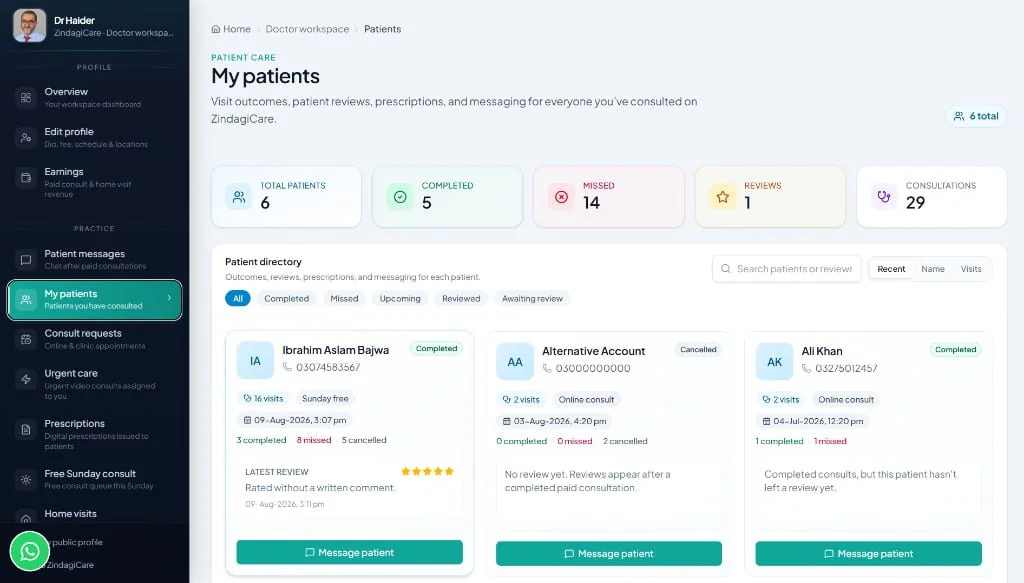
A directory of everyone you have seen — completed, missed, upcoming, and reviewed. Open a card for visit counts, last contact, and a message button.
During a video consult you can prescribe medications, set dosages, add clinical notes, and generate a professionally formatted PDF. Patients download it anytime from their dashboard. Open Prescriptions in the sidebar to review or issue an Rx after the call.
Volunteer care
Every Sunday, verified doctors volunteer short video consults for patients who cannot afford care. You choose whether to take part, which patients to see, and when.
ZindagiCare does not charge Sunday free patients anything: no consultation fee and no platform fee. Patients who cannot afford care are marked Cannot afford paid care on the board.
A patient who can afford it may choose to pay an optional contribution of PKR 500. It goes to the doctor who treats them under the normal 70% policy: PKR 350 to you, PKR 150 to the platform. It appears in Earnings once the payment is confirmed and you have tapped Finish consultation.
Patient requests
A patient asks for a free Sunday consult and answers a short medical history. They do not choose a doctor. Each patient can make one free request per week.
You pick the patient
Open Sunday free consult in your workspace. Read the history on the open board, choose a time (Pakistan time) on that Sunday, and tap Pick patient. The patient is told who their doctor is and when.
Run the consult
Join the video from your Patient queue. Video and chat stay open past the slot, so you or the patient can leave and rejoin. You can issue an e-prescription during or after the call.
Finish consultation
When you are done, tap Finish consultation. This marks it completed, closes the video room and chat, and asks the patient to review you.
Always tap Finish consultation
A consult (paid or Sunday free) is completed when you close it, from your consult requests, the Patient queue on your Sunday free consult page, or the screen you see after leaving the video call. Until then chat stays open, it is not counted as completed, earnings are not credited, and the patient cannot leave you a review. If you forget, an attended consult is completed automatically 72 hours after the slot.
Video and chat stay open until you close it
Leaving the call does not end the consult — the same rule as paid consults. If you do not tap Finish consultation, it stays open, is not counted as completed, and the patient cannot review you. If the patient attended, the system completes it 72 hours after the slot.
You must still join on time
If you never join the video room by 15 minutes after the end of your chosen slot, it counts as a missed consult under the attendance rules below.
Release if you cannot make it
Before the consult starts, tap Release on a picked patient. They go back to the open board so another doctor can pick them.
Patient no-shows
If the patient does not turn up, tap No-show. This also closes video and chat. Patients with 3 no-shows are blocked from Sunday consults for 4 weeks.
Patients from an earlier Sunday
Requests that no doctor picked on their Sunday appear under From an earlier Sunday. Picking one schedules it on the current Sunday.
Reviews count toward your profile
Reviews from finished Sunday consults appear on your public profile like any other review — another reason to always tap Finish consultation.
Practice standards
Patients book a real slot with you. Repeated no-shows restrict your account.
A miss is counted if you never join the video room and the scheduled window has ended, plus 15 minutes.
Three missed online or Sunday consults in one calendar month (Pakistan time) trigger a formal warning.
Five misses in a month remove you from booking. Contact the ZindagiCare team to restore your account.
Questions
The details doctors ask before joining — fees, Sunday, payouts, and cities.
You keep 70% of the patient payment on online, clinic, and urgent consults, and 70% on in-house doctor visits. ZindagiCare retains 30% as the platform fee. Amounts shown in Earnings are already your 70% share.
Yes. You set your own online consultation fee in Edit profile. Patients see that fee when they book you. Your 70% is calculated on whatever fee you set (and on the platform fee for urgent care and home visits).
Payouts are processed monthly to your registered bank account. Email info.zindagicare@gmail.com or WhatsApp us to request a payout or update bank details.
Sunday free consultation is volunteer work, and ZindagiCare does not charge these patients anything. A patient who can afford it may choose to pay an optional PKR 500 contribution. If they do, you receive 70% (PKR 350) under the normal policy, credited once the payment is confirmed and you have finished the consultation. You choose whether to take part and can disable it at any time.
Yes. Video and chat stay open, even if you or the patient leave the call, until you tap Finish consultation, either on your Sunday free consult page or on the screen after you leave the video call. Only then is the consult marked completed, any contribution credited to your Earnings, and the patient asked to review you.
Online consultations, urgent care, Sunday free consults, and in-house (home visit) doctor services are available across Pakistan.
Create a doctor account, then submit your PMDC registration number, CNIC, PMDC certificate, CNIC front and back, and degree certificate. Admin reviews your application before your profile goes live.
If you do not join an online or Sunday consult within 15 minutes after it ends, it counts as a miss. Three misses in a calendar month trigger a warning. Five misses in a month restrict your account so patients can no longer book you until admin restores it.
Admin assigns an available doctor. You should join the secure video session within 10 minutes. Enable urgent care alerts so you are notified even when the app is closed. You can issue an e-prescription during the call.
Register, complete PMDC verification, and start seeing patients online and at home across Pakistan.